

During an upgrade from vSphere 8 to VMware vSphere Foundation (VVF) 9.1.1, the deployment itself finally went through (after a firewall issue I wrote about earlier). Then I tried to assign the licenses in VCF Operations, and that didn’t work either. The license had exactly as many cores as the environment needed, but VCF Operations wanted more, because it counted the cores of the vSAN witness appliance. Tagging the physical witness host for the vSAN witness license (KB 401072) fixed it.
The environment: 14 hosts, a stretched cluster and a 464-core VVF license #
- 14 ESX hosts with 32 cores each, in two vSAN clusters: 448 cores
- A stretched vSAN cluster with 10 hosts
- A regular vSAN cluster with 4 hosts
- The vSAN witness appliance of the stretched cluster runs on a standalone physical ESX host with 16 cores at a third site.
- A VVF license for 464 cores, which matches the 448 cores of the cluster hosts plus 16 for the physical witness host
- Two vSAN add-on licenses: 148 TiB and 28 TiB
- VCF Operations registered in connected mode, with the licenses downloaded from the VCF Business Services console
Why VCF Operations asked for 480 cores instead of 464 #
In VCF Operations, under Manage > Licensing > Licenses & Registration, I selected the vCenter and clicked Assign Primary License. The page said that no licenses were assignable, and the tooltip on the VVF license showed why:
To assign this license, it must have allocated capacity of 480 cores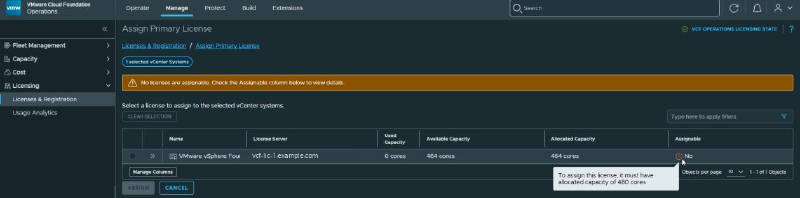
So VCF Operations counted 16 cores more than I expected. In the host list I found where they came from. The vSAN witness appliance was listed with 16 cores, and the tooltip next to it said this:
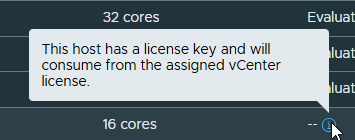
The witness appliance comes with its own embedded license, so I didn’t expect it to use any vSphere cores. But according to VCF Operations it would consume from the vCenter license after all. VCF Operations added up the cores like this:
- 14 hosts × 32 cores = 448 cores
- The physical witness host: 16 cores, so 464
- The vSAN witness appliance: another 16 cores, so 480
Removing the witness host or the witness appliance only moved the problem #
To confirm the math, I temporarily removed the physical witness host from vCenter and waited for VCF Operations to sync. The unlicensed used capacity dropped to 464 cores:
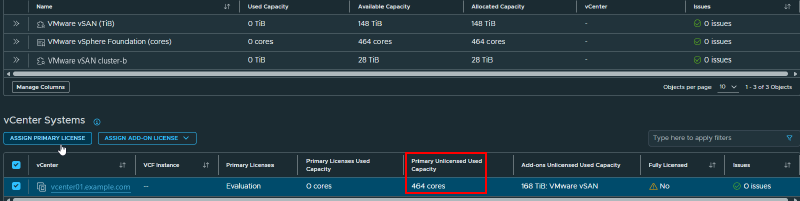
At 464 cores, the VVF license assigned without problems. But then I couldn’t add the witness host back to vCenter, because the license had no cores left for it.
So I removed the witness appliance from the inventory instead. Now I could add the witness host back, but not the witness appliance. The problem only moved around.
Tag the physical witness host for the vSAN witness license (KB 401072) #
In 9.x, a physical ESX host that runs a vSAN witness appliance can use the vSAN witness license instead of consuming vSphere cores. You do have to tag it as a witness host yourself, as described in KB 401072.
The current witness host wasn’t compatible with VCF/VVF 9 anyway, so a new physical witness host was already prepared. On that host I checked the setting and enabled it:
esxcli vsan witness license get
#    Enabled: false
esxcli vsan witness license set --enable true
esxcli vsan witness license get
#    Enabled: true
Then I rebooted the host and added it to vCenter. At first it still showed the evaluation license. That changed when I assigned the vSAN add-on license to the vCenter: the new witness host picked up the vSAN license and didn’t consume any of the 464 vSphere cores.
After that I deployed a new vSAN witness appliance on the new witness host, made it the witness of the stretched cluster, and removed the previous witness host and its appliance from vCenter. The new appliance also got the vSAN license.
In the end VCF Operations showed 448 cores used, which is only the 14 cluster hosts. The physical witness host doesn’t need any vSphere cores anymore, and the witness appliance is no longer counted against the VVF license.
Don’t assign a license to the witness appliance by hand, though. That overwrites its embedded license, and the only way to get it back is to redeploy the appliance. See KB 400783 and KB 423673.
Check witness hosts and appliances when the core count doesn’t match #
If VCF Operations asks for more cores than your license has, check the host list for vSAN witness hosts and witness appliances. Physical witness hosts in 9.x need the witness tag from KB 401072 to use the vSAN witness license instead of vSphere cores.
Before the upgrade, add up the cores of every host in vCenter, including physical witness hosts, and compare that with your license.
I hope this helps anyone who runs into the same issue.
A. Kadir Akbel